How to sync Booking.com and Airbnb with your own website's calendar (without a channel manager)
You take bookings on Booking.com, on Airbnb, by phone and through your own website. Here's how to keep one calendar true everywhere, and when you really do need a channel manager.
7 min read · Updated
Short answer
Booking.com and Airbnb can both read and publish a calendar link (iCal) for each room. You can connect them to each other for free, or connect both to one central calendar that also shows free nights on your own website. Updates aren't instant (from 30 minutes to a few hours), only dates go across, and Booking.com offers it only to properties whose room types each have a single unit. If you need prices and instant updates across many rooms, that's a channel manager's job.
How calendar sync works
Every booking site can give each room a calendar link: a web address ending in .ics that lists the nights that room is booked. Another site can import that link and block the same nights. That's all calendar sync is: sites reading each other's lists of booked nights, on a timer.
Three limits apply to every calendar-sync tool, not just ours:
- It isn't instant. Each site re-reads the others' links on its own schedule: Airbnb every 3 hours, Booking.com on a schedule it doesn't publish. A double booking is possible in that window, so you want a tool that tells you when it happens.
- Only dates go across. No prices, minimum stays or guest details.
- Booking.com allows it only for small properties with single rooms. Calendar sync shows up in the extranet only if the property has 20 room types or fewer and each room type has one unit. If you sell "Double room × 3" as one room type on Booking.com, no calendar tool can sync it: list the rooms separately there, or use a channel manager.
Your three options
| What it costs | Covers your website and phone bookings? | Good for | |
|---|---|---|---|
| 1. Booking.com and Airbnb directly | Free | No | One holiday home on two sites, no website of its own |
| 2. One central calendar | From free plugins to a monthly fee | Yes | Small places with their own website and direct guests |
| 3. A channel manager | A monthly fee, often per room | Yes | Many rooms, prices and instant updates on many sites |
Option 1: connect Booking.com and Airbnb to each other
- Copy Airbnb's link. In Airbnb:
Calendar→ choose the listing →Availability→ underConnect calendars,Connect to another website(in the app:Airbnb calendar export) → copy the link. - Paste it into Booking.com. In the Booking.com extranet:
Rates & Availability→Sync calendars(in some views the menu is calledCalendar & Pricing) → add a calendar connection for the same room → paste it and name it "Airbnb". - Do the reverse. On the same
Sync calendarspage, copy Booking.com's export link for that room (choose booked dates only, if it offers the choice), and add it in Airbnb underConnect calendars→ paste the link → name it →Add calendar. - Test it. Block one night on one site and check that it appears on the other a few hours later.
This works, but phone, e-mail and website bookings still live in your notebook or spreadsheet, and you have to block them by hand on both sites. That's where most double bookings come from.
Option 2: one central calendar that also shows on your website
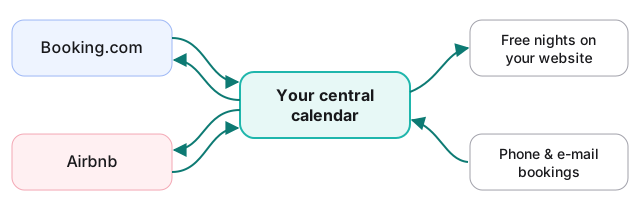
Here every site talks to one calendar, and that calendar is also what guests see on your website. Your direct bookings go in once and reach Booking.com and Airbnb by themselves.
Using  as the example (other tools work in a similar way):
- Set up your rooms the way Booking.com sells them: one room per room you list there. If you set up "Double" as 3 identical rooms booked as one, one click splits it into Double 1, Double 2 and Double 3, bookings included.
- Bring Booking.com and Airbnb in. For each room, paste its Booking.com and Airbnb export links on the
Calendar syncpage. Their bookings show as taken on your website calendar, checked every 30 minutes. - Send your own bookings out. Each single room has its own calendar link. Paste it into Booking.com's and Airbnb's calendar import: nights you book by phone, or confirm from a request on your website, then show as unavailable there.
- Put the calendar on your website. One short snippet shows free nights to guests and lets them send a booking request that you approve.
Avoid the echo
A central calendar must never send back what it received from Booking.com, or a booking cancelled on Booking.com can come back as a block. only sends out its own bookings. On the booking sites, export booked dates only wherever you can.
If a double booking happens anyway
When both sites sell the last room inside the sync window, marks both bookings red and e-mails you once. Cancel one of them, and the warning clears by itself at the next sync.
The exact clicks are in the help centre: calendar sync in .
Option 3: a channel manager
A channel manager connects to Booking.com and Airbnb through their official connections instead of calendar links. Availability updates within seconds, and it also sends prices, minimum stays and other rules. That's worth paying for if you have many rooms, change prices often, or sell identical rooms as one room type. For a guesthouse with a handful of rooms that mostly wants no double bookings, it's usually more tool than you need.
Checklist before you rely on it
- One room on Booking.com = one room in your calendar = one link each way.
- Export booked dates only, and never send back what you imported.
- Block a test night and watch it arrive on every side.
- Know where double-booking warnings go, and check that inbox.
- On a busy peak weekend, if a double booking would really hurt, offer the last free room on one site only.
Questions
How often does Booking.com update an imported calendar?
On its own schedule, which it doesn't publish, and you can't make it read the link sooner. Airbnb reads imported calendars every 3 hours. That's why a warning about double bookings matters more than how fast your own tool syncs.
Can I sync a room type I sell as "Double room × 3" on Booking.com?
Not with calendar links: Booking.com offers calendar sync only when every room type has one unit. Either list the rooms separately on Booking.com, or use a channel manager.
Do guest names or prices sync?
No. Calendar links carry booked dates only. Guest details stay on the site where the guest booked.
Does this work with Vrbo or Google Calendar too?
Yes. Anything that publishes a calendar link (.ics) can be imported, and most holiday-rental sites can import one.
Where do Booking.com and Airbnb explain this themselves?
In Booking.com's partner help and Airbnb's help centre. Menu names change from time to time; if a step here doesn't match what you see, their pages have the current names.
Try it on your own website
shows free nights on your own website, lets guests send a request you approve, and syncs dates with Booking.com and Airbnb. €10 per property a month, the first 3 months free, no card needed.